EH GMS Fixture Export Cleaner
The new GMS from England Hockey allows you to download a CSV file of fixtures for a club, but the format isn't 100% ideal for importing into a club management system (like Teamo). This tool lets you open an exported file and will clean up the fields for you.
1. Choose File
2. Enter Club Name
Enter your clubname as it appears in the GMS data in your Teams. e.g. for "Mytown Women 3" enter "Mytown". This is used for two purposes:1. To detect whether the fixture is home or away. 2. To pick out if any teams are just "Mytown" and append Women 1 / Men 1 on the end.
Append Gender to all team names
What it does
Updated file will have:- Competition/Event Separated into two columns
- Home Team and Venue Split into two columns
- New Column "My Team" added
- New Column "Opposition" added
- New Column "Home/Away" added
- Top teams will be made unique e.g. "Clubname" -> "Clubname Men 1"
- Any extra columns removed
Getting a File from the GMS
Updated file will have:- Login as a club admin
- Go to fixtures
- Choose your date range
- You'll probably want to choose "All Associations"
- Click Search
- You should see all the fixtures you asked for
- Click the Export button at the top
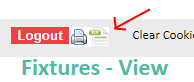
- Your export will download
- You can upload it using Choose File on this page
Free Tool, No Warranties!
This tool is free, was quickly written to make importing fixtures easier. There are no warranties on accuracy, so check the output file you get!
If you do find it useful, and your club isn't already signed up to easyfundraising, sign up using the link below, and we'll get some bonus donations (at no detriment to your fundraising).

Get easyfundraising for your club here
Built for Trojans HC, based on papaparse and SheetJS. Not endorsed by or associated with England Hockey.